System architecture – Recruitment AI
This document gives a high-level view of how the Recruitment AI system is built. It follows a lightweight C4-style structure:
- System Context (C4 L1) – who uses the system and what external systems it talks to.
- Containers (C4 L2) – main deployable pieces (web app, databases, external services).
- Components (C4 L3) – key modules inside the web app (routes, agents, services).
- Dynamic views – key flows (feedback generation, incoming email handling).
C4 diagrams (L1–L3) are produced in PlantUML (C4-PlantUML) and embedded below as images. Dynamic flow diagrams are expressed in Mermaid for readability in Markdown.
1. System Context (C4 L1)
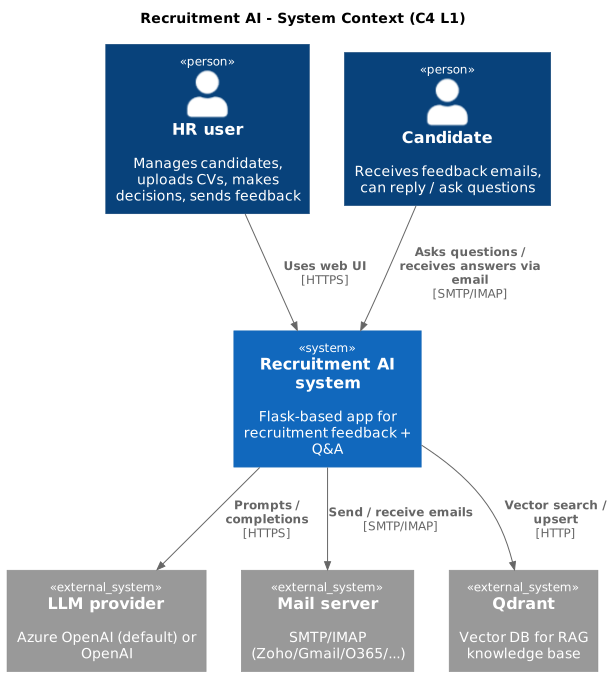
At the highest level, the system consists of:
- HR user (person) – uses the web UI to manage candidates, upload CVs, make recruitment decisions, and send feedback emails.
- Candidate (person) – receives feedback emails and can reply or send questions.
- Recruitment AI system (this system) – Flask-based app that:
- stores candidates, positions, tickets and model responses in SQLite,
- talks to LLM providers (Azure OpenAI or OpenAI) via the LLM adapter,
- sends and (optionally) monitors email via SMTP/IMAP,
- uses Qdrant for RAG (retrieval-augmented generation) when answering questions.
- External systems:
- LLM provider – Azure OpenAI (default) or OpenAI used for parsing CVs, generating feedback, validating/correcting emails, and answering questions (with or without RAG).
- SMTP/IMAP mail server – Zoho, Gmail, Office 365, or any provider supporting SMTP/IMAP.
- Qdrant – vector database used as the RAG knowledge base.
Diagram (PlantUML → image)
2. Containers (C4 L2)
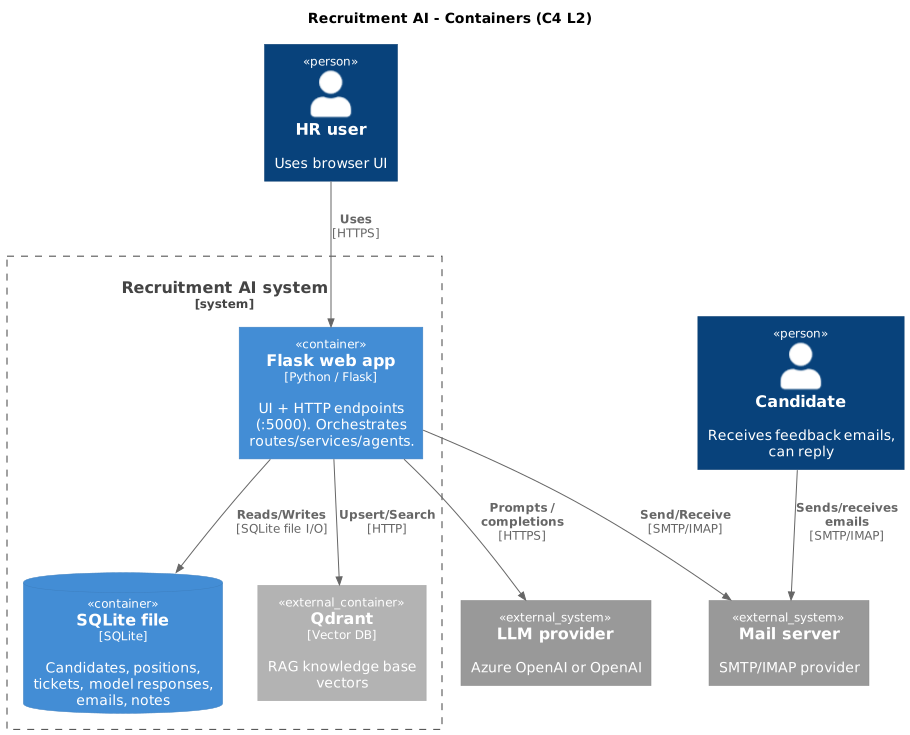
From the container point of view, the system typically consists of:
- Web app container – Flask application (Python) running as:
- local
python app.pyprocess in development, or -
Docker container (see
Dockerfile,docker-compose.yml). It exposes HTTP endpoints on port 5000. -
SQLite database (file) – single-file database on disk:
- stores candidates, positions, tickets, model responses, emails and notes,
-
lives under
data/or project root, depending on configuration / Docker volume. -
Qdrant – vector store used for RAG:
- can run as a Docker container (
qdrantservice indocker-compose.yml) or as an embedded/local instance (via local file path), -
stores embedded documents from
knowledge_base/. -
LLM provider – not hosted by this project:
- Azure OpenAI (default) – accessed with Azure endpoint + deployment names,
- OpenAI (optional) – accessed via
api.openai.comusing the official client, -
selected by
LLM_PROVIDER(azure/openai) and wired throughllm/adapter. -
Mail server (SMTP/IMAP) – external provider:
- configuration through
SMTP_HOST,SMTP_PORT,SMTP_USE_TLS,IMAP_HOST,IMAP_PORT,EMAIL_USERNAME,EMAIL_PASSWORD, - the app does not care which provider is used as long as it speaks SMTP/IMAP.
Diagram (PlantUML → image)
3. Components (C4 L3 – layers inside the web app)
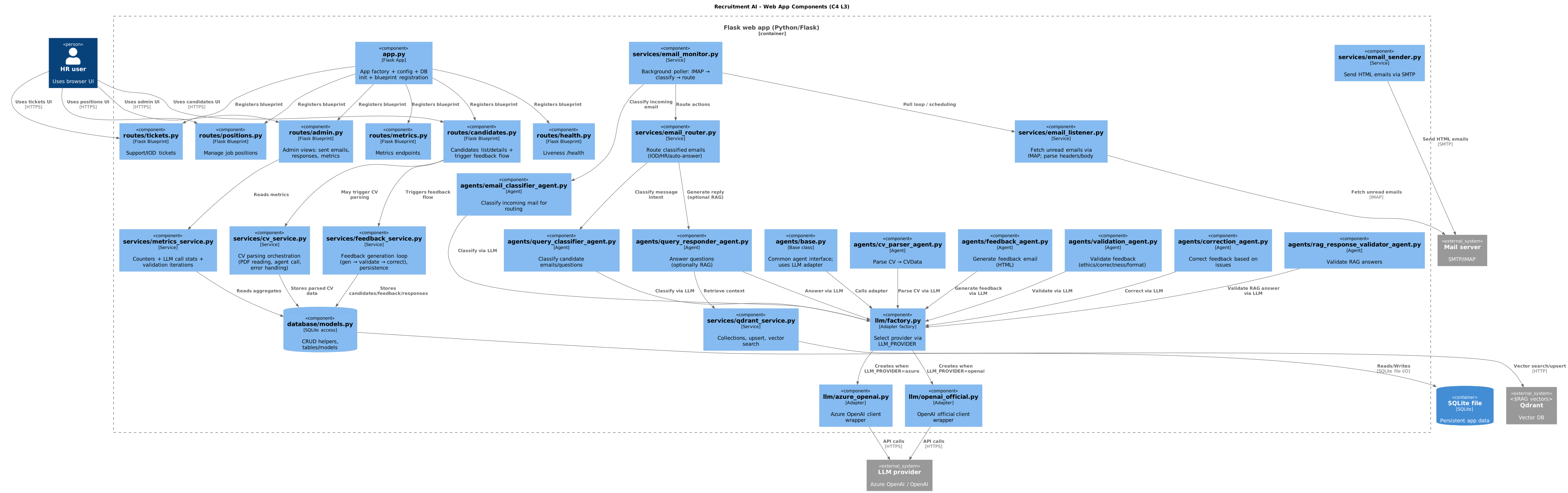
This section describes the main architectural layers inside the Flask web application (not a file-by-file list; see Appendix: Code map for that).
3.1 Layer overview
| Layer | Responsibility |
|---|---|
| HTTP API + UI | Flask routes and templates; exposes candidate/position/ticket CRUD, process (reject/accept), admin, health. |
| Workflow Orchestrator | Runs the feedback loop (CV → parse → draft → validate → correct → send) and the inbound-email loop (fetch → classify → route / reply). |
| LLM Gateway / Adapter | Single entry point to Azure OpenAI or OpenAI; retries, timeouts, logging; prompt templates live in prompts/. Agents call through this layer only. |
| Agent Runtime | CV Parser, Feedback, Validation, Correction, Email Classifier, Query Classifier, Query Responder (and RAG response validator). Each agent has a clear input/output contract (see below). |
| Email Adapter | SMTP sender (outbound) and IMAP listener (inbound); provider-agnostic, config-driven. |
| Persistence | SQLite for candidates, positions, tickets, model responses, HR notes, feedback emails; file system for uploaded CVs and config. |
| RAG Store | Qdrant: vector ingestion from knowledge_base/, similarity search; used by Query Responder and (optionally) feedback context. |
3.2 Agent contracts (inputs / outputs)
| Agent | Input | Output |
|---|---|---|
| CV Parser Agent | Raw CV (text or PDF path) | CVData (structured) |
| Feedback Agent | CVData, HR notes, position/job offer |
Draft email HTML |
| Validation Agent | Draft email HTML | ValidationResult (approved / issues) |
| Correction Agent | Draft email HTML + validation issues | Corrected email HTML |
| Email Classifier Agent | Inbound email (headers + body) | Label + routing directive (IOD / HR / consent_yes |
| Query Classifier Agent | Classified inquiry (email content / thread) | Response strategy (direct_answer / rag_answer / forward_to_hr) |
| Query Responder Agent | Inbound question + optional RAG context | Answer text (optionally validated by RAG response validator) |
All agents use the LLM Gateway; no direct OpenAI/Azure client calls in agent code.
3.3 Diagram (PlantUML → image)
Appendix: Code map
- HTTP API + UI:
app.py,routes/candidates.py,routes/positions.py,routes/tickets.py,routes/process.py,routes/admin.py,routes/health.py,templates/. - Workflow / orchestration:
services/feedback_service.py,services/cv_service.py; inbound loop inservices/email_monitor.py,services/email_router.py,services/email_listener.py; admin metrics inservices/metrics_service.py. - LLM Gateway:
llm/base.py,llm/azure_openai.py,llm/openai_official.py,llm/factory.py; prompts inprompts/*.py. - Agents:
agents/cv_parser_agent.py,agents/feedback_agent.py,agents/validation_agent.py,agents/correction_agent.py,agents/email_classifier_agent.py,agents/query_classifier_agent.py,agents/query_responder_agent.py,agents/rag_response_validator_agent.py. - Email adapter:
services/email_sender.py,services/email_listener.py. - Persistence:
database/models.py,database/*.py; SQLite file underdata/or project root;uploads/for CVs. - RAG Store:
services/qdrant_service.py,knowledge_base/load_to_qdrant.py.
4. Key constraints and safety
- Human-in-the-loop: Outbound feedback email is sent only after an explicit HR action (e.g. “Reject” with “Send feedback”). Auto-reply to inbound emails is optional and can be gated by feature flag or policy.
- Fail-closed: If validation or policy checks fail, the system does not send the email; the flow stops or retries correction until approved or manually overridden.
- PII boundaries: CV text, HR notes and candidate data are sent to the LLM for feedback generation; the design assumes a trusted LLM provider and no masking in this MVP; for production, consider redaction or on-prem models.
- Audit trail: Model prompts and responses (or their hashes) and template versions can be stored (e.g. in
model_responsesand related tables) for traceability and HR compliance.
5. Technical decisions
5.1 Flask
- Why: Lightweight, easy to run locally and in Docker, minimal dependencies; fits MVP and educational use.
- Trade-off: No built-in async job queue, horizontal scaling, or auth; add them if moving toward production.
5.2 SQLite
- Why: Single-file DB, no separate server; sufficient for small/medium datasets and demos.
- Trade-off: Concurrency and scale limits; migrate to PostgreSQL (or similar) for multi-worker or high-load scenarios.
5.3 Qdrant and RAG
- Why: Simple vector store; documents from
knowledge_base/are embedded and stored; on query: embed query → vector search → inject context into LLM prompt. Used for candidate questions (company, process, IOD/GDPR). - Trade-off: Embedding model and collection design are fixed in this MVP; tune for latency and relevance in production.
5.4 State
- Persistent: SQLite (canonical), Qdrant (vectors), file system (uploads). Transient: in-process caches. No external session store; intentionally simple for the MVP.
6. External dependencies
- LLM providers (Azure OpenAI / OpenAI) via
llm/adapter: CV parsing, feedback generation, validation/correction, incoming email classification and answering (with/without RAG). - SMTP / IMAP mail servers: Any provider supporting SMTP/IMAP; fully config-driven.
- Qdrant: Vector DB for RAG; runs as embedded/local or Docker service.
7. Dynamic views (flows)
7.1 Recruitment / feedback flow (Mermaid)
CV Service calls CV Parser Agent for parsing; Feedback Agent only generates draft HTML from already-parsed CVData. The LLM provider is shown as a participant because all agent steps go through it.
sequenceDiagram
    participant HR as HR
    participant Web as Web App
    participant CVS as CV Service
    participant CVP as CV Parser Agent
    participant LLM as LLM Provider
    participant FBA as Feedback Agent
    participant VAL as Validation Agent
    participant COR as Correction Agent
    participant SMT as SMTP Server

    HR->>Web: 1. Reject candidate in UI
    Web->>CVS: 2. Process CV (candidate, PDF path)
    CVS->>CVP: 3. Parse CV (raw text / PDF)
    CVP->>LLM: 3a. LLM call
    LLM-->>CVP: 3b. Structured data
    CVP-->>CVS: 4. CVData
    Web->>FBA: 5. Generate feedback (CVData, HR notes, job offer)
    FBA->>LLM: 5a. LLM call
    LLM-->>FBA: 5b. Draft HTML
    FBA-->>Web: 6. Draft email HTML
    Web->>VAL: 7. Validate feedback email
    VAL->>LLM: 7a. LLM call
    LLM-->>VAL: 7b. Result
    VAL-->>Web: 8. ValidationResult
    alt approved
        Web->>SMT: 9. Send email
        SMT-->>HR: 10. Delivery / log in UI
    else rejected
        Web->>COR: 9a. Correct (draft + issues)
        COR->>LLM: 9b. LLM call
        LLM-->>COR: 9c. Corrected HTML
        COR-->>Web: 10a. Corrected HTML
        Web->>SMT: 11a. Send email
        SMT-->>HR: 12a. Delivery / log in UI
    end
7.2 Incoming email handling flow (Mermaid)
Policy check happens before auto-reply: the router decides IOD / HR / auto-reply only after classification; auto-reply is the path where policy allows answering without human review.
flowchart TB
    subgraph Monitor[Email monitor]
        EMon[EmailMonitor]
        EListen[EmailListener]
        EClass[EmailClassifierAgent]
        Policy[Policy / routing decision]
        ERouter[EmailRouter]
        QR[QueryResponderAgent]
        RAG[QdrantRAG]
        Mail[IMAP mailbox] --> EListen
        EListen --> EMon
        EMon --> EClass
        EClass --> Policy
        Policy --> ERouter
        ERouter --> IODBox[IOD_EMAIL]
        ERouter --> HRBox[HR_EMAIL]
        Policy -->|if auto-reply allowed| QR
        QR --> RAG
        RAG --> QR
        QR --> MailOut[SMTP server]
    end